Example01 / 15
按定义计算模块度
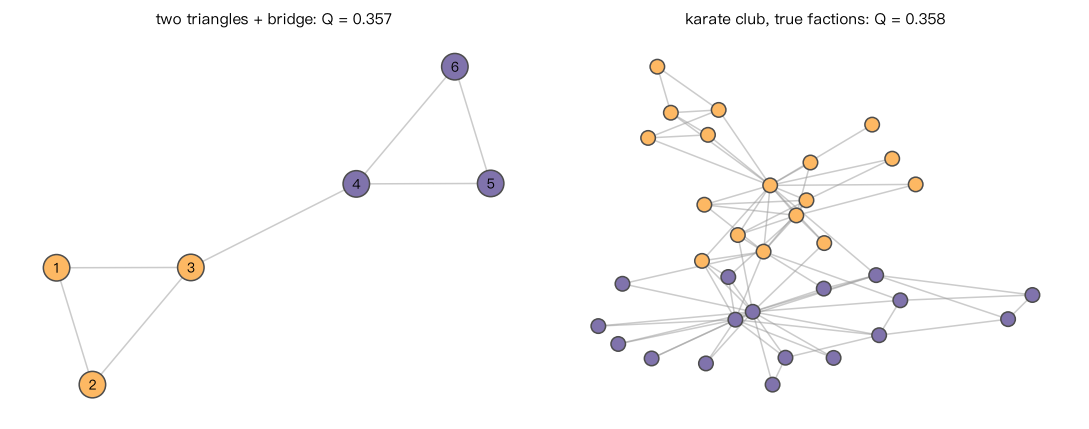
用按社团求和的公式 Q = Σ_c [ l_c/m - (d_c / 2m)^2 ](l_c:社团内部边数;d_c:社团度之和)计算: (a) “两个三角形 + 一条桥”的小网络按两个三角形划分时的 Q(手算约 0.357); (b) 空手道俱乐部按真实分裂的两派划分时的 Q。 输出:按定义计算的结果与 nx.community.modularity 一致。
Output输出图
Output文字输出
两个三角形: 按定义 Q=0.357, NetworkX=0.357
两个三角形放在同一社团: Q=0.000
空手道真实两派: 按定义 Q=0.358, NetworkX=0.358
Code代码
# 用按社团求和的公式 Q = Σ_c [ l_c/m - (d_c / 2m)^2 ](l_c:社团内部边数;d_c:社团度之和)计算:
#   (a) “两个三角形 + 一条桥”的小网络按两个三角形划分时的 Q(手算约 0.357);
#   (b) 空手道俱乐部按真实分裂的两派划分时的 Q。
# 输出:按定义计算的结果与 nx.community.modularity 一致。
import networkx as nx


def my_modularity(G, communities):
    m = G.number_of_edges()
    Q = 0.0
    for c in communities:
        l_c = G.subgraph(c).number_of_edges()
        d_c = sum(d for _, d in G.degree(c))
        Q += l_c / m - (d_c / (2 * m)) ** 2
    return Q


H = nx.Graph([(1, 2), (2, 3), (1, 3), (4, 5), (5, 6), (4, 6), (3, 4)])
parts_H = [{1, 2, 3}, {4, 5, 6}]

K = nx.karate_club_graph()
G = nx.Graph(K.edges())                       # 去掉边权,按无权网络计算
club = [{n for n in K if K.nodes[n]["club"] == "Mr. Hi"},
        {n for n in K if K.nodes[n]["club"] != "Mr. Hi"}]

print("两个三角形: 按定义 Q=%.3f, NetworkX=%.3f" % (my_modularity(H, parts_H), nx.community.modularity(H, parts_H)))
print("两个三角形放在同一社团: Q=%.3f" % my_modularity(H, [set(H)]))
print("空手道真实两派: 按定义 Q=%.3f, NetworkX=%.3f" % (my_modularity(G, club), nx.community.modularity(G, club)))

# 作图:两个网络按给定划分着色,标题给出 Q
import matplotlib.pyplot as plt

fig, axes = plt.subplots(1, 2, figsize=(10, 4))
for ax, (net, parts, name, seed) in zip(axes, [(H, parts_H, "two triangles + bridge", 0), (G, club, "karate club, true factions", 4)]):
    lab = {v: i for i, c in enumerate(parts) for v in c}
    pos = nx.spring_layout(net, seed=seed)
    nx.draw_networkx_edges(net, pos, ax=ax, edge_color="0.6", alpha=0.5)
    nx.draw_networkx_nodes(net, pos, ax=ax, node_size=300 if net is H else 90,
                           node_color=["#fdb863" if lab[v] == 0 else "#8073ac" for v in net], edgecolors="0.3")
    if net is H:
        nx.draw_networkx_labels(net, pos, ax=ax, font_size=9)
    ax.set_title("%s: Q = %.3f" % (name, my_modularity(net, parts)), fontsize=10); ax.axis("off")
plt.tight_layout(); plt.show()Run在浏览器中运行
首次加载 Python 环境约需 20–40 秒;可以修改参数后重新运行。